Quick Start
Get started with Atlas Cloud API in minutes
Get your API key and make your first API call in under 2 minutes.
Step 1: Create Your Account
Sign up for a free Atlas Cloud account at atlascloud.ai. All new users get an extra 20% bonus on their first top-up.
Step 2: Get Your API Key
- Go to API Keys
- Click Create API Key
- Copy and save your API key securely
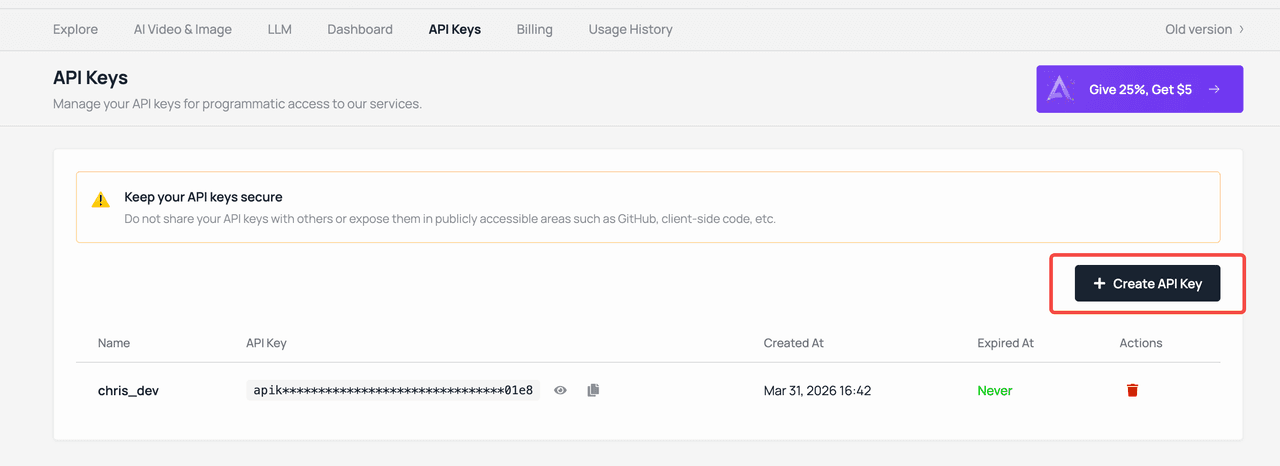
For more details on managing API keys, see the API Keys guide.
Step 3: Add Funds
First Top-Up Bonus
All new users get an extra 20% bonus on their first top-up. Sign up via a referral link to get 25% bonus instead (up to $100).
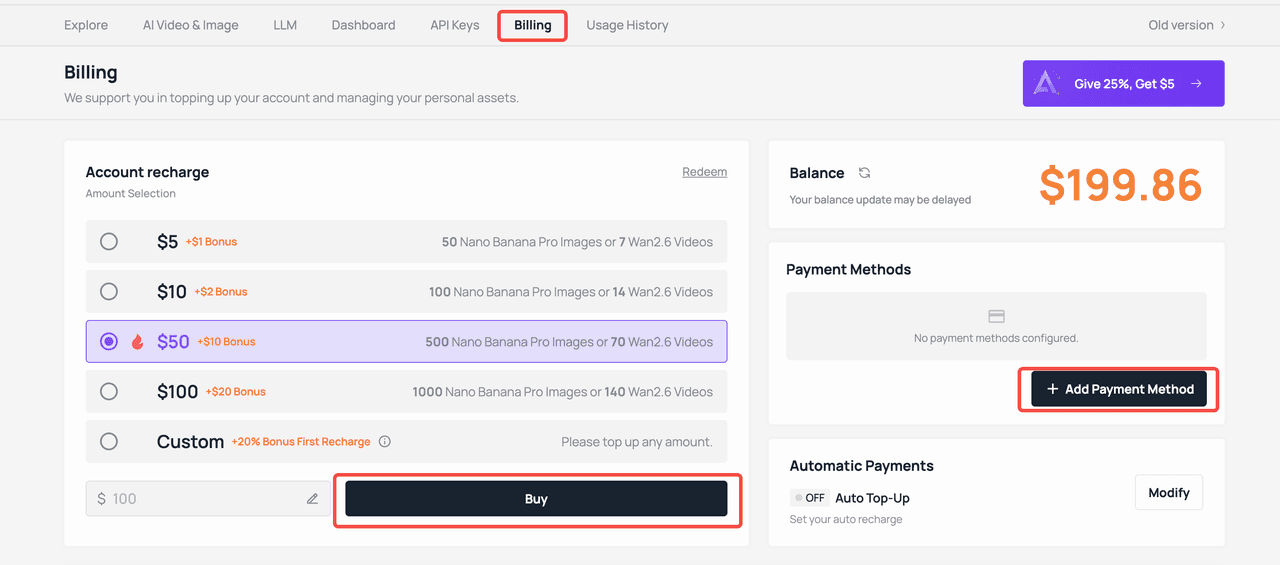
Add funds at Billing via credit card, WeChat Pay, Alipay, or cryptocurrency. See Pricing for details on rates and volume discounts.
- Go to Top-up & Billing
- Select the payment amount
- Add a payment method
- Click Buy
Step 4: Make Your First API Call
Chat with an LLM
Atlas Cloud's LLM API is fully OpenAI-compatible. If you're already using the OpenAI SDK, just change the base URL and API key.
from openai import OpenAI

client = OpenAI(
    api_key="your-api-key",
    base_url="https://api.atlascloud.ai/v1"
)

response = client.chat.completions.create(
    model="deepseek-v3",
    messages=[
        {"role": "user", "content": "Hello! What can you do?"}
    ]
)

print(response.choices[0].message.content)
import OpenAI from "openai";
const client = new OpenAI({
apiKey: "your-api-key",
baseURL: "https://api.atlascloud.ai/v1",
});
const response = await client.chat.completions.create({
model: "deepseek-v3",
messages: [{ role: "user", content: "Hello! What can you do?" }],
});
console.log(response.choices[0].message.content);curl https://api.atlascloud.ai/v1/chat/completions \
-H "Authorization: Bearer your-api-key" \
-H "Content-Type: application/json" \
-d '{
"model": "deepseek-v3",
"messages": [
{"role": "user", "content": "Hello! What can you do?"}
]
}'Generate an Image
curl -X POST https://api.atlascloud.ai/api/v1/model/generateImage \
  -H "Authorization: Bearer your-api-key" \
  -H "Content-Type: application/json" \
  -d '{
    "model": "seedream-3.0",
    "prompt": "A beautiful sunset over snow-capped mountains, photorealistic"
  }'
Generate a Video
curl -X POST https://api.atlascloud.ai/api/v1/model/generateVideo \
  -H "Authorization: Bearer your-api-key" \
  -H "Content-Type: application/json" \
  -d '{
    "model": "kling-v2.0",
    "prompt": "A rocket launching into space with dramatic lighting"
  }'
Upload Media
Upload local files to get temporary URLs for image-to-video, image editing, and other workflows:
curl -X POST https://api.atlascloud.ai/api/v1/model/uploadMedia \
  -H "Authorization: Bearer your-api-key" \
  -F "[email protected]"
Get Generation Result
Image and video generation tasks are asynchronous. Use the prediction ID returned from the generation request to check the status and retrieve results:
curl https://api.atlascloud.ai/api/v1/model/getResult?predictionId=your-prediction-id \
  -H "Authorization: Bearer your-api-key"
Step 5: Explore Models
Browse all 300+ available models on the Model Library to find the right model for your use case. Each model page includes:
- Interactive playground for testing
- API usage examples with parameters
- Pricing information
Next Steps
- Model APIs Overview — Learn about all supported model types and providers
- LLM / Chat Models — Deep dive into LLM integration
- Image Generation — Explore image generation models
- Video Generation — Explore video generation models
- API Keys Management — Manage and secure your API keys
- MCP Server — Use Atlas Cloud models directly in your IDE
- Claude Code Skills — Integrate Atlas Cloud into Claude Code workflows
- API Reference — Full API documentation
- Using history — User-created task history